Option: NetExplorer Watermark

The option that applies a document watermark to
, providing invisible, secure, and deterrent traceability

With NetExplorer Watermark, enhance the security of your PDF files by automatically adding a watermark
to them, helping to prevent leaks or unauthorized distribution. Each file is marked with a unique identifier to trace its origin—even after it has been downloaded—and to secure the sharing of sensitive information. 

Why choose the NetExplorer Watermark option?

Enhanced traceability, all the way to the final recipient

Each shared file is automatically tagged with a unique identifier, which makes it possible to trace the source in the event of unauthorized distribution.

You can choose to add a visible watermark displaying the user's name or the date, which acts as an immediate deterrent against unauthorized copying or sharing.

NetExplorer Watermark works effectively with external download links. When a file is sent outside your organization, it is automatically watermarked.

"This technology was developed through a strategic partnership with WATOO, a specialist in digital branding
for businesses, and integrates natively with the NetExplorer platform."

Bertrand Servary
CEO of NetExplorer
Tag your files and monitor their distribution

An advanced invisible tattoo for seamless traceability

At the heart of Watermark technology is an invisible digital watermark that is embedded directly into PDF files at the time of download. This discreet mark does not alter the content or appearance of the file in any way, but allows the origin of a document to be uniquely identified, even if it is shared again or printed.

  • This invisible marker acts as a tamper-proof digital fingerprint: in the event of a leak, NetExplorer can precisely trace the download back to the user or the link that initiated it.

A visible and deterrent watermark

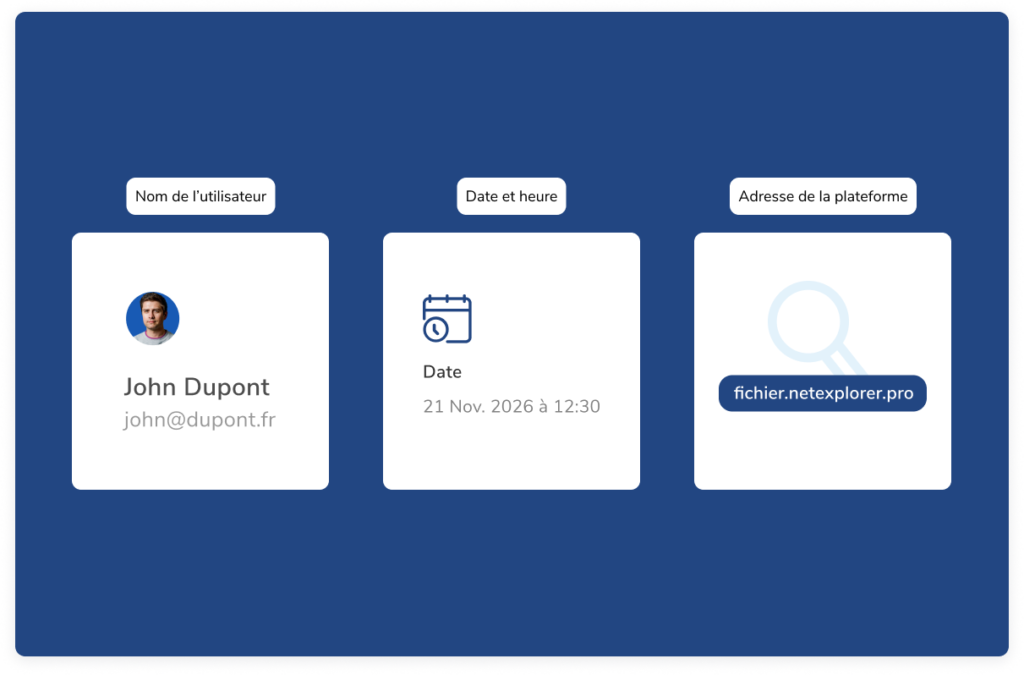
In addition to the invisible watermark, NetExplorer Watermark offers a visible watermark that is automatically displayed on PDF files. This watermark can contain information such as:

  • Username

  • The date and time of the download

  • The address of your platform

This marking serves as an immediate deterrent: every user knows that the file they are viewing is marked with their name, which greatly reduces the risk of intentional or accidental disclosure.

Extended protection for ZIP archives generated on the platform

PDF files contained in ZIP archives generated by the NetExplorer platform are also protected by watermarks. Thus, even when a user downloads multiple documents via a compressed archive, each PDF file contained in the ZIP will be watermarked according to the defined rules.
  • This approach ensures security consistency, even during batch sharing or bulk transfers.

Targeted activation based on your user groups

NetExplorer Watermark offers advanced configuration options. You can enable or disable watermarking:

For certain internal user groups (e.g., management, HR, legal)

For users outside the organization (customers, partners, vendors)

Or only when downloading via sharing links

This allows you to implement a tailored security policy based on actual usage and the sensitivity level of the shared files.

Proximity, trust,
human values,
beyond digital.
Want to find out more? Our experts can help you discover our solution at
.

NetExplorer Watermark: What are its use cases?

Sharing confidential documents with third parties

Whether it’s a strategic RFP, a contract currently under negotiation, or sensitive documents sent to a service provider, files shared outside your organization are always at risk of being disseminated without your control.

With NetExplorer Watermark, every PDF document downloaded by a third party can be: invisibly watermarked with the sender’s or recipient’s identity, or visibly watermarked to deter any capture, copying, or reuse.

In the event of a leak or unauthorized sharing, you can trace the exact source of the leak, even if the file has been removed from the NetExplorer platform. This passive yet formidable security measure protects your strategic communications.

Protection of sensitive legal, HR, or financial documents

Legal, HR, and finance departments handle files containing confidential or personal data on a daily basis: employment contracts, service agreements, pay stubs and electronic payroll records, financial projections, management reports, compliance documents, and more.

With NetExplorer Watermark, these files can be automatically watermarked upon download, whether for sensitive internal use or for sending to an external firm. In the event of a recipient error or a leak, you can immediately identify the source. Ideal for strengthening document governance in sensitive departments.

Controlled distribution of proprietary or strategic content

Marketing, technical, and sales departments often share high-value internal content, such as pre-publication brochures, market research reports, customized sales proposals, and confidential product sheets.

By embedding an invisible watermark in each file, you retain control over your creations, even after they’ve been shared. The visible watermark also serves as a deterrent for the recipient.

You effectively protect your intellectual property from unauthorized copying or misuse.

Secure collaboration on confidential or multi-stakeholder projects

In projects involving multiple organizations (M&A, consortia, joint development, joint bidding), confidentiality and the traceability of communications are critical issues.

With NetExplorer Watermark:

  • Each project participant can be identified by the watermark on their PDF files

  • You can enable watermarking for certain groups of users or partners

  • In the event of a dispute or a leak, you’ll have concrete evidence to act quickly

A valuable assurance of security for sensitive projects, those subject to NDAs, or those of high strategic importance.

What's included in the NetExplorer Watermark option

In order to allocate a dedicated HDS infrastructure and generate your own encryption key, you will need to contact one of our experts or your account manager.

NetExplorer Watermark

Advanced invisible watermarking of PDF files

Automatic visible watermark

Watermarking PDF content in a ZIP archive (generated from the platform)

Targeted activation by user group

Enhanced traceability for external downloads

Native integration with the NetExplorer platform

An additional option to our solutions

NetExplorer Watermark is not a standalone solution, but a security extension that is fully integrated into our NetExplorer Workspace collaboration suite .

This option is designed for organizations that want to take their file protection to the next level by combining traceability, deterrence, and data sovereignty. By integrating Watermark into your existing workflows, you can strengthen your security posture without changing your current practices.

Discover more options

Immutable backup on LTO magnetic tapes

A sovereign cloud environment, 100% dedicated

Secure, compliant signing without leaving NetExplorer

HDS

The option dedicated to healthcare data compliance

Frequently Asked Questions

The Watermark option applies only to PDF files, including those contained in a ZIP archive generated from the platform.

A visible watermark is displayed directly on the file (e.g., user name, download date). An invisible watermark inserts a discreet digital signature into the file that is not visible, allowing its origin to be identified even after it has been modified or printed.

Yes. You can enable or disable watermarking for specific user groups, or restrict document watermarking to external downloads only.

No. Watermarking is not supported for access via NetSync, WebDAV, NetExplorer Drive, or the API, in order to prevent all synchronized files from being automatically watermarked.

Thanks to invisible watermarking, if a file is shared without authorization, it is possible to trace the source of the download link.

Select the connection space that's right for you